atkAutoEq
1.3.0
Features
- Automatic dynamic equalizer audio plugin (VST3 & AU)
- Live and post-production
- FFT modes with spectral processing, high and low resolution
- Voice mode with harmonics balancing EQ
- 5-band parametric post & sidechain EQ
- Real-time FFT spectrum display
- External sidechain support
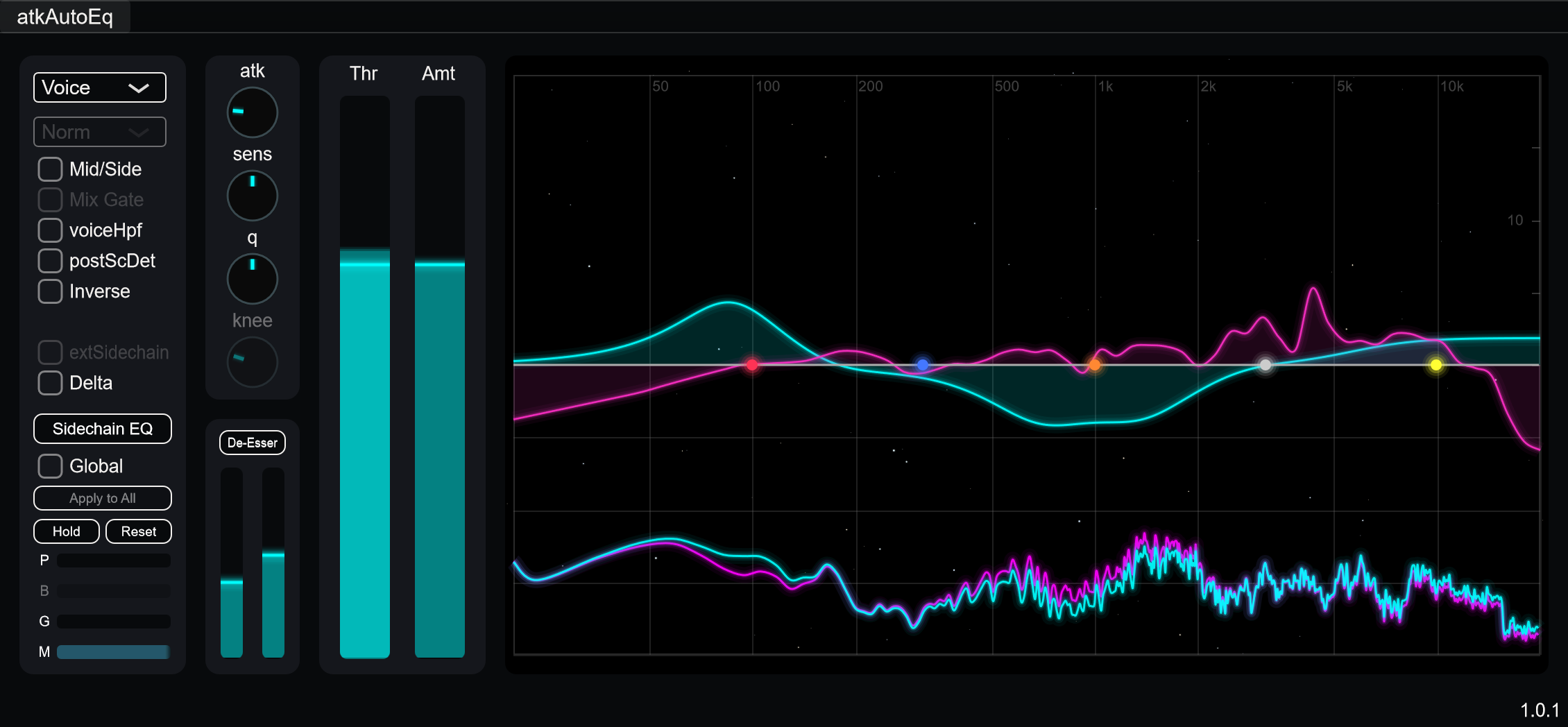
atkAutoEq is an automatic and dynamic equalizer. FFT modes apply spectral dynamics processing, useful for taming resonances and smoothing out frequency response across a wide range of material. Voice mode uses spectral analysis to identify harmonics and applies equalization to normalize their levels, producing consistent tonal balance for speech sources. A built-in de-esser, and 5-band post EQ and sidechain EQ allow further manual shaping.
Like all atkAudio products, atkAutoEq is designed to support sound engineers in live and post-production environments, especially those working with speech and dialogue, helping them deliver consistently solid results for their clients. However, the vast majority of atkAutoEq FFT mode users are music producers, and mixing and mastering engineers.
Parameters
Processing Mode
- Mode: Selects processing algorithm.
- Voice: Analyzes spectrum and normalizes harmonic levels using regular zero-latency IIR EQ processing. Good for speech.
- FFT HiRes: Spectral processing. Higher resolution, higher latency.
- FFT LoRes: Spectral processing. Lower resolution, less CPU and latency.
Core Dynamics
- Threshold: Detection threshold for gain control. Frequencies below this level are not processed.
- Amount: Maximum amount of gain adjustment.
Voice Mode
- Attack: Response time for gain changes.
- Sensitivity: Adjusts how sensitive the processor is to detected harmonics.
- Q: The Q factor of applied EQ.
- HPF: Enables 24 dB/oct high-pass filter.
- Hold: Holds current EQ curve.
- Reset: Resets all harmonic gains to zero.
- Mix Gate: Gate for dry/wet routing. When signal is above threshold, wet processing is selected; otherwise dry signal is selected.
De-Esser
- Enabled: Enables sibilance reduction.
- Threshold: Sibilance detection threshold.
- Amount: Sibilance compression depth.
FFT Mode
- FFT Attack: Envelope attack time.
- FFT Release: Envelope release time.
- FFT Smooth: Spectral smoothing amount.
- FFT Knee: Soft knee for compression curve.
- FFT Mode: Selects normal or average-deviation ballistics mode.
- Alt: Alternative “averaging” processing mode.
Processing Options
- Expander: Inverts gain curve. Boosts frequencies instead of cutting.
- Delta: Monitors difference.
- Mid/Side: Enables mid/side stereo processing.
- External Sidechain: Uses external sidechain input for analysis and detection. E.g. for carving space or reduce masking between two sources.
- Post SC Det: Sidechain analysis pre-/post-EQ selection.
Output
- Pre-Gain: Input gain before processing.
- Gain: Output makeup gain.
- Dry/Wet: Blend between unprocessed and processed signal.
- Channel Balance: Processing balance between channels.
Post EQ (5 Bands)
Manual EQ applied after dynamic processing. Each band has frequency, gain, Q, and type controls.
- Band 1: Peak, Low Shelf, or High-Pass (24 dB/oct).
- Band 2: Peak or Low Shelf.
- Band 3: Peak.
- Band 4: Peak or High Shelf.
- Band 5: Peak, High Shelf, or Low-Pass (24 dB/oct).
Sidechain EQ (5 Bands)
Separate EQ applied to sidechain detection path. Same band structure as post EQ. Shapes what the detector responds to without directly affecting the output signal.
Usage Examples
Voice Mode
- Select Voice mode
- Adjust Threshold so processing engages only on speech
- Set Amount to control how much EQ is applied
- Adjust Sensitivity for detection reliability, “just enough” rather than “all in”
- Use HPF to clean up low-end rumble relative to detected fundamental
- Enable De-Esser and adjust threshold to catch problematic sibilance
- Shape final tone with Post EQ bands
FFT Mode
- Select FFT or FFT LoRes mode
- Set Threshold to define the floor of processing
- Adjust Amount to control processing depth
- Use FFT Attack/Release to set response speed
- Adjust FFT Smooth to control spectral resolution smoothing
Notes/Tips
- Voice mode works best on single-voice speech sources. Multi-speaker or music content is better suited for FFT modes.
- Use sidechain EQ to make the detector emphasize or de-emphasize specific frequency ranges. E.g. If voice output sounds too bassy, boost low frequencies in sidechain EQ to compensate.
- Delta mode is useful for monitoring what the processor is changing.