atkAutoleveller
1.4.1
Features
- Autoleveller audio processing plugin (VST3 & AU)
- For podcasting, streaming, events, broadcasting, game, film & TV sound and audio drama
- Live and post-production
- Input and output stage limiters
- Loudness measurement
- Optional oversampling on output limiter
- Up to 64 channels
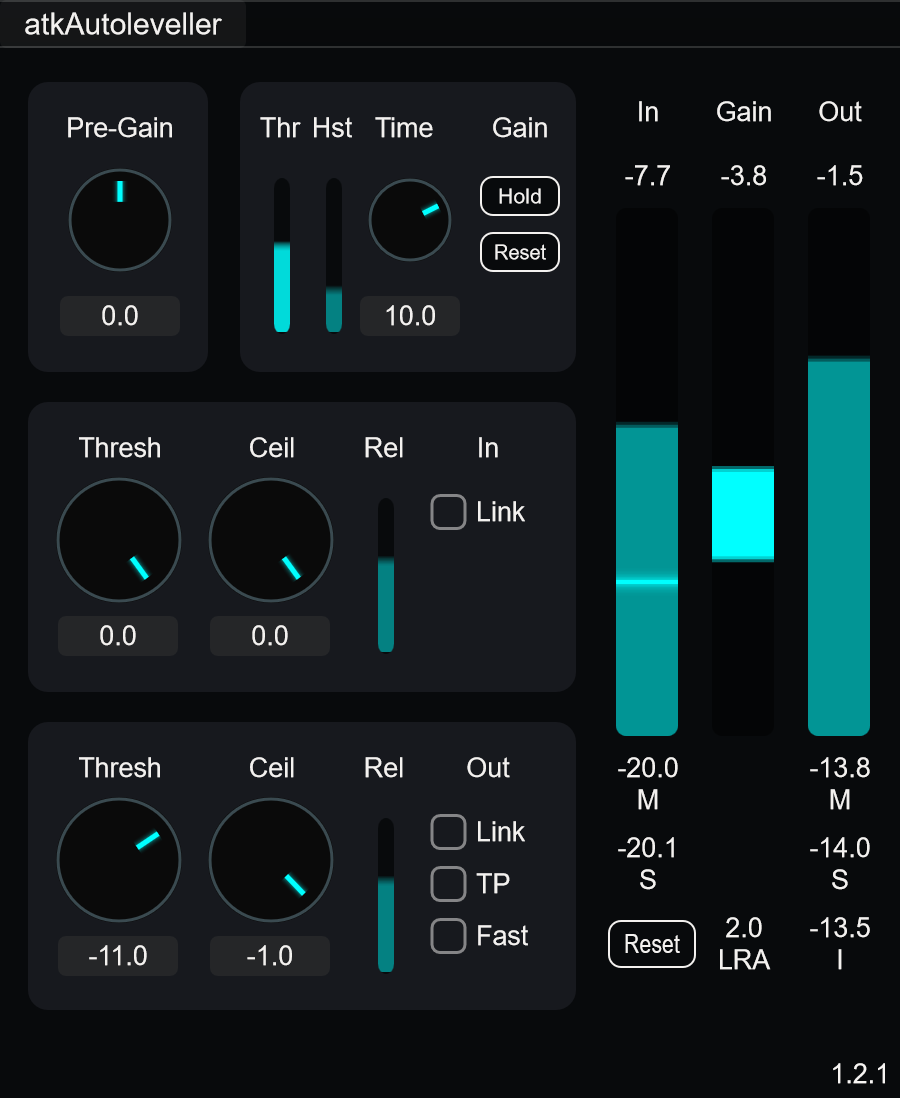
atkAutoleveller helps to automate audio level control especially for long-format program material such as podcasts and streams, adjusting overall audio level to match a specific target level in real-time. It can even help produce standards-compliant results and ensure consistency for day-to-day operations. Input stage limiter can be used to protect auto-leveller detector from sudden loud bursts of sound. Output stage limiter allows setting (or offsetting) final output level. Autoleveller threshold controls the minimum audio level required to engage auto-levelling; hysteresis controls the minimum change in signal level required to trigger adjustment, to prevent constant small adjustments.
Parameters
Main
- Pre-Gain: Adjusts input gain before any processing.
- Threshold: Threshold in relation to internal reference level. Prevents ambience or background noise from triggering auto-levelling circuit.
- Hst (Hysteresis): Dead-zone around current loudness level. When enabled, gain adjustments only occur when loudness moves outside this band, reducing constant small corrections. Set to 0 to disable.
- Time: Time constant controlling speed of auto-leveller gain adjustment.
- Hold: Holds auto-leveller gain at current level.
- Reset: Gradually resets auto-leveller gain to unity. Also clears hysteresis reference.
Input Limiter
- Threshold: Input limiter threshold level.
- Ceiling: Input limiter output ceiling level.
- Release: Release time with S-shaped release curve.
- Link: Links threshold and ceiling controls together.
Output Limiter
- Threshold: Output limiter threshold level.
- Ceiling: Output limiter output ceiling level.
- Release: Release time with adaptive release. Faster when limiting hard, slower when limiting light.
- Link: Links threshold and ceiling controls together.
- True Peak: Enables 4x oversampling for true peak limiting.
- Fast: Enables fast attack with lower lookahead latency. When disabled, uses slower attack for more transparent limiting.
Usage
- Adjust source gains or Pre-Gain to get input level roughly to midpoint on input meter
- Enable Link on input limiter
- Adjust input Threshold/Ceiling to catch loudest parts (beginnings of phrases, laughter)
- Optionally adjust input Release time. Shorter times give more aggressive sound, longer times give smoother sound.
- Adjust Threshold to keep ambience/background noise below threshold
- Set Time to fit your material. Controls how quickly leveller responds to changes in loudness.
- Set output Threshold and Ceiling. Determines final output level.
- Optionally adjust output Release time
Notes/Tips
- Use input limiter to protect auto-leveller circuit from sudden loud bursts of sound.
- Internal reference level is approximately -24 LUFS.
- Setting threshold and ceiling at same level maintains internal unity level.
- Example: Setting output threshold to -11 dB and ceiling to -1 dB effectively increases level by 10 dB (difference between threshold and ceiling), resulting in roughly -14 LUFS output.
- Higher hysteresis suits dynamic material like classical music. Lower hysteresis works better with speech. Set to 0 for continuous adjustment (disables hysteresis).
- Lowering output limiter threshold can help create solid and constant level. Fast attack and short release are good for catching sporadic peaks.