atkAutomixer
1.5.0
Features
- Automixer audio plugin (VST3 & AU)
- Standalone operation including ASIO and CoreAudio driver support, e.g. for external hardware or network drivers
- For podcasting, streaming, events, broadcast, game, film & TV sound and audio drama
- Live and post-production
- Multi-channel and multi-instance modes
- Up to 64 input channels and groups
- Gain sharing and adaptive gating algorithms
- Gain automation and/or MIDI output (VST3/Standalone) e.g. to remote control multi-cam cut or external mixer
- Gain metering
- Dynamic channel colour on supported hosts
- Fast and transparent response
- Input gain and weight adjustments
- Automatic weight adjustment
- Multi-channel output in multi-channel mode
atkAutomixer is a classic audio automixer (sometimes called auto-gate or auto-expander). It operates by comparing input levels from multiple sources, attenuating low level inputs and preserving gain on sources with higher input levels. This results in a transparent and effective attenuation of inactive source mic levels, and reduction of combined noise floor and comb filtering effects without typical unwanted gating or spectral filtering artefacts. Or, in practice, automatically mixing the source mics. atkAutomixer can handle a variety of situations from properly conducted interviews to full event days of heated long form debates. It can help maintaining consistent quality over long live sessions, or save hours of manual labor in post-production with level automation.
Automixers are commonly used to process multiple input channels in podcasts, broadcasts, panels, live events, spoken-word productions, film, TV and game audio, theater, and public venues. atkAutomixer can also be used to automatically ‘track’ the active speaker on a stage with multiple static mics. In music production, an automixer can be useful with small choirs, vocal ensembles, or sections of close-mic’d instruments. When used in combination with stage ambience (or ‘spill’) mics, atkAutomixer can also work as a primary source mic expander, for example on a lead vocal microphone on a loud stage.
atkAutomixer is fast and accurate, and can be used in live and post-production. It can be used as a multi-channel plugin instance on a bus or aux, or as multiple mono or stereo plugin instances on individual tracks, or as a standalone application.
Parameters
Global
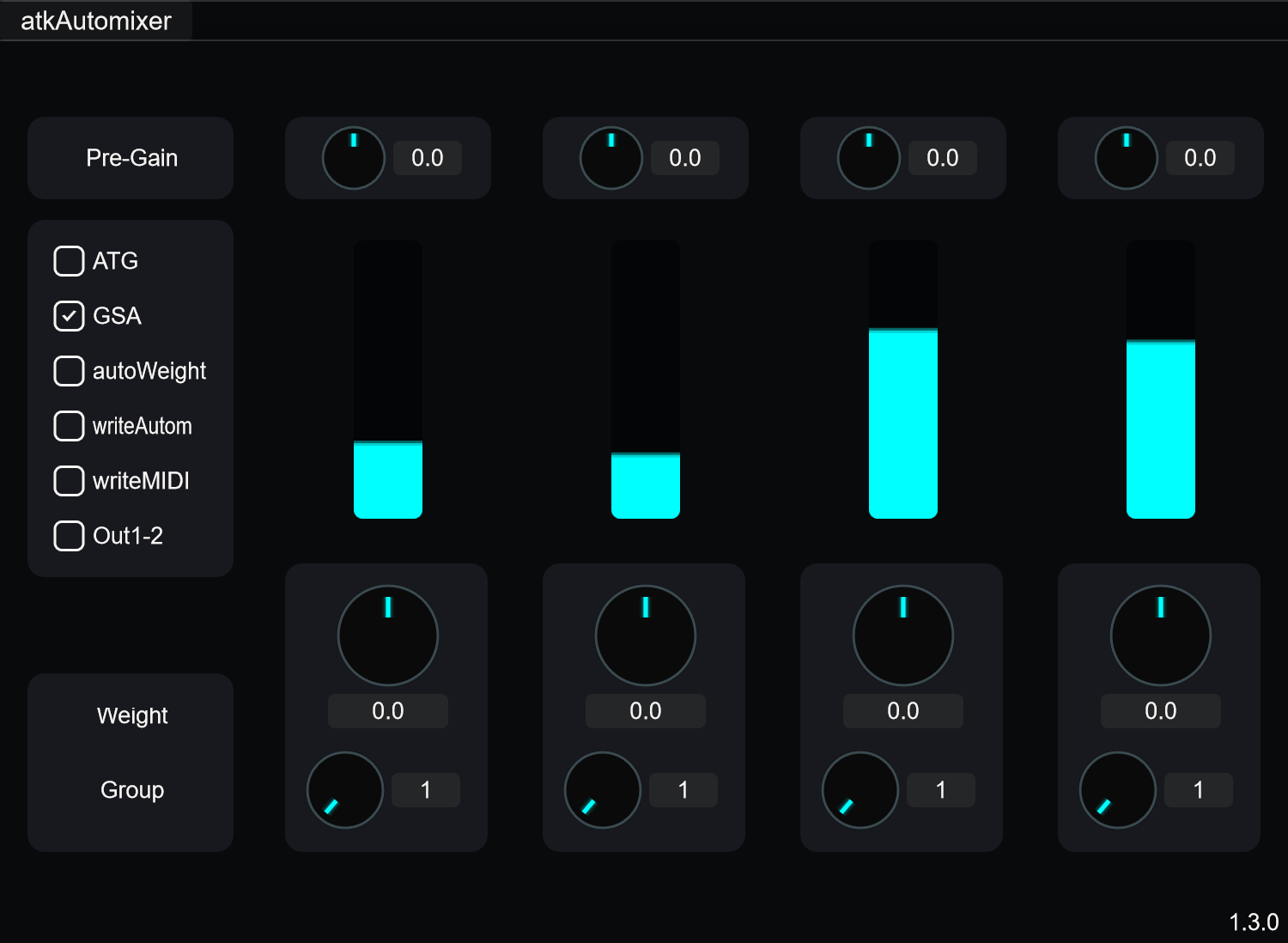
- GSA: Gain sharing algorithm. Classic constant-gain based automixer.
- ATG: Adaptive threshold gating. Keeps high input level channel gains fully open and lower input level channel gains at fixed attenuation.
- Auto Weight: Enables automatic weight adjustment.
- Write: Records gain and active channel changes as automation curves into host software.
- Write MIDI: Outputs MIDI CC data for external control. CC#0 = active channel number, CC#1–64 = channel gains (127 = unity). VST3/Standalone only.
- Out 1-2: Sums output into channels 1-2.
Per-Channel
- Pre-Gain: Input gain adjustment per channel.
- Weight: Adjusts internal sidechain detection level. Higher weight makes channel behave as if louder without changing audible level. Useful for giving priority to specific channels (debate host, presenter).
- Group: Assigns channel to discrete group. Channels in different groups have no effect on each other.
Modes
Multi-Channel Mode
Single automixer plugin instance placed into multi-channel bus (or aux/group) in host DAW. Each channel operates as input and output for this automixer instance. Recommended for critical applications and better overall performance. All plugin instances with 3 or more channels operate in multi-channel mode.
Multi-Instance Mode
Each plugin instance operates as input and output for one shared automixer system. Easy and fast to set up, but may not be compatible with all audio plugin hosts. Mono and stereo plugin instances operate in multi-instance mode. Introduces latency depending on buffer size.
Usage
- Insert atkAutomixer on multi-channel bus or on individual tracks
- Select algorithm: GSA (default) or ATG
- Adjust Pre-Gain per channel if needed to balance input levels
- Use Weight to give priority to specific channels (e.g. host microphone, presenter)
- Assign channels to Groups for isolated automixing sections
- Enable Write to record automation or Write MIDI for external control
Notes/Tips
- Gain meters display linear range between -24 dB and 0 dB.
- Pilot tone trick: Create channel with low-level sine wave just above mic noise floor. Feed into discrete atkAutomixer channel. Keeps all channels attenuated during silence except pilot tone. Mute this channel output after processing to prevent it reaching mix.
- Standalone software can be used directly with audio drivers and hardware (network audio drivers, USB audio devices).
Multi-Instance Mode Tips
- Generally same limitations as hardware-based processors.
- Instances require synchronous audio input.
- Each instance should be preceded by same amount of plugin delay.
- Disable multi-threading/multi-processing for live inputs.
- Turn off adaptive/pre-emptive audio processing, buffering, or dynamic loading in host software.
- Place instances in separate auxes/buses/groups.
- Modified playback rates may have unexpected results.
- Host software with multiple open projects may have unexpected results.
- Connect dummy sidechain inputs to common source.
- Consider using multi-channel plugin instance instead.