atkDucker
1.2.2
Key Features
- Audio ducker plugin (VST3 & AU)
- Adjustable lookahead time for pre-ducking (0-5000 ms)
- Mid/side (center) ducking mode
- High-shelf filter ducking mode with adjustable frequency
- Mix sidechain source to output
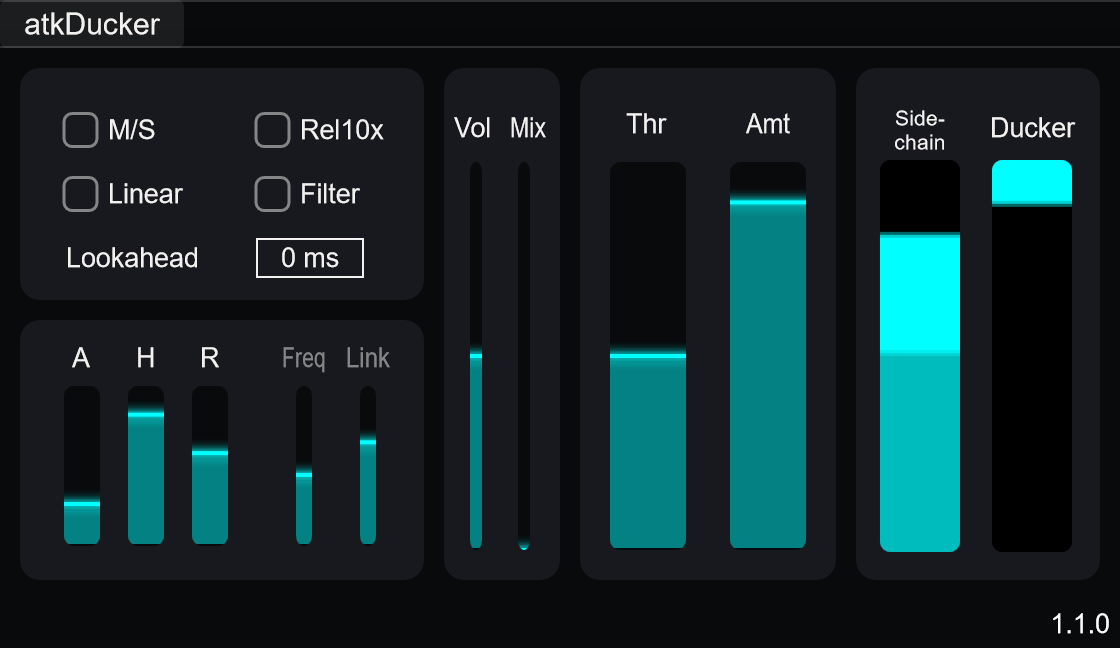
atkDucker is a audio ducker plugin designed for reducing background audio materials when a priority source such as speech is present in the sidechain input. It is useful for ducking audio content like music or game audio under commentary & dialogue, voice-over and announcements in live and post-production workflows. Mid/side mode allows attenuation to focus on the center image while preserving stereo width, and filter mode enables high-frequency ducking with adjustable frequency.
Parameters
Main
- Threshold: Level at which sidechain signal triggers ducking.
- Amount: Controls how much main signal is reduced when ducking is active.
- Attack: Time for ducker to reach full attenuation after sidechain exceeds threshold.
- Hold: Time to maintain ducking after sidechain drops below threshold.
- Release: Time for ducker to return to unity gain after hold period.
Mid/Side Mode
- Mid/Side (Center) Mode: Ducks only center (mono) content.
- M/S (Center) Link: Controls how much side channels follow center ducking.
Options
- Lookahead: Pre-ducking delay time in milliseconds (0-5000 ms, default 0). Value 0 disables lookahead. Causes matching latency.
- Filter Mode: Enables high-frequency ducking.
- Filter Frequency: Sets the high-shelf frequency for ducking.
- Linear Time Constants: Uses linear-in-dB attack and release ramps to reach the target ducking gain over the selected time.
- Release Time 10x: Multiplies release time by 10 for longer release times.
Levels
- Main Input Level: Adjusts level of main input signal.
- Mix Sidechain to Output: Option to blend sidechain signal into main output.
Usage
- Insert atkDucker audio plugin to ducking target track (e.g. music, game audio)
- Route key source (e.g. voice, dialogue) to sidechain input
- Adjust Threshold so ducking triggers when voice is present
- Set Amount to control how much background is reduced
- Adjust Attack for smooth or fast ducking response
- Set Hold and Release to match pacing of content
- Use Mid/Side mode to duck only center while keeping stereo ambience
Notes/Tips
- When blending sidechain to main output, usually desirable to mute original sidechain source to avoid doubling.
- Too much ducking can sound distracting, so adjust Amount carefully.
- Too fast attack, hold, or release can cause audible artifacts.